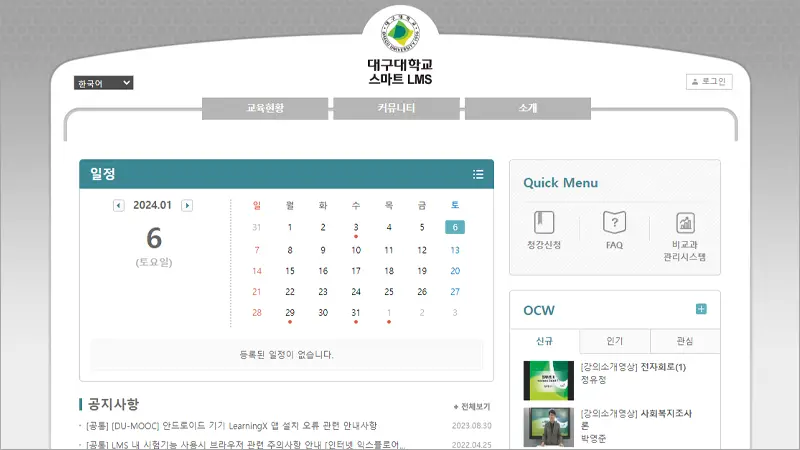
대구대학교 LMS 홈페이지 접속 안내입니다. 대구대학교 LMS는 수업의 효과적인 운영을 지원하고 교수-학생, 학생-학생 간의 자료와 의견을 자유롭게 교환할 수 있는 커뮤니티 공간입니다.
[ 목차 ]
대구대학교 LMS 홈페이지

SMART LMS for Daegu University
대구대학교 LMS는 수업의 효과적인 운영을 지원하고 교수-학생, 학생-학생간의 자료와 의견을 자유롭게 교환할 수 있는 커뮤니티 공간입니다. Copyright 2015 Daegu University. All Rights Reserved.
lms.daegu.ac.kr
대구대학교 LMS 홈페이지 이용 안내
로그인 방법은?
대구대학교 학교 포탈 아이디, 패스워드를 동일하게 LMS 홈페이지 로그인 사용하시면 됩니다.
강의과목 파일용량 증설 방법은?
강의과목 당 사용할 수 있는 디스크 공간이 500MB 할당됩니다. 되도록 파일 사이즈를 작게 해서 파일 업로드 해야겠지만 불가피하게 디스크 공간을 다 사용했을 경우 관리자에게 증설 요청해야 합니다. 요청방법은 홈 > 커뮤니티 > 질의응답에 글을 올리거나 급한 경우 하단에 있는 전화번호로 문의하세요.
대구대학교 LMS 소개
대구대학교 LMS는 수업의 효과적인 운영을 지원하고 교수-학생, 학생-학생간의 자료와 의견을 자유롭게 교환할 수 있는 커뮤니티 공간입니다.
(Daegu University LMS is a community space that supports effective class operation and that enables the free exchange of materials and opinions between professors and students as well as among students.)
LMS 역할
| 교수(Professor) | 학생(Student) |
|---|---|
| 학생들에게 수업 내용을 편리하게 전달 원활한 과제물 취합 및 의견 수렴교안 및 참고 자료의 효율적인 관리 (It allows professors to conveniently deliver class content to students, easily collect assignment and opinions, and efficiently manage lesson plans and reference materials.) | 교안 및 수업관련 정보를 손쉽게 해결 자유로운 질문 및 의견 제시 (It allows students to easily access lesson plans and class information, and freely ask questions and present opinions.) |
LMS 주요기능
- 학기별로 클래스가 개설/종강됨(Classes opened/closed per semester.)
- 수강신청된 강의에 자동으로 e클래스 회원 등록 (A student is automatically registered as an e-Class member for a class that he/she signed up for.)
- 청강신청을 통해 수강외 과목에 대한 자료 열람 가능 (A student can view materials of a subject that is not what he/she signed up for by making an audit request.)
- 강의계획서, 강의평가, 성적공시등을 한곳에서 할 수 있음 (Various tasks can be handled in one place, including the syllabus, class evaluations, and disclosure of grades.)
이상입니다.
[더 읽어볼거리]